PCISniffer 1.5

Areas of Use

  • PCI device detection for PCs
  • vendor and device names in plain text
  • displaying PCI configuration data
  • detecting PCI resource conflicts


  • New in version 1.5:


  • Storing PCI data to floppy disk
  • 1634 vendors in clear text
  • 4829 devices in clear text


  • Program Description

    If you want to have the full control of your computer, you ought to know which devices are installed in your machine. Independent of the installed operating system the PCISniffer displays the PCI header data of all PCI devices on the BUS unaltered.

    PCISniffer scans all PCI busses in the PC and detects automatically which busses and devices are present. You can comfortably browse the detected devices and list all functions of these devices in a detailled display. Since the installed operating system will not be booted, it has no possibility to alter the configuration, thus allowing you the direct access to the data. This makes it possible to detect resource conflicts and solve them.

    Even if your computer runs problem-free it is often interesting to know, which devices exactly are installed. Besides the not very useful PCI numbers the real name of the device and the vendor are shown; the complete list of installed PCI devices or parts of it can be sent over the serial interface to a connected computer, where the complete configuration can be saved.
    Download

    SpeeDefrag 5.2

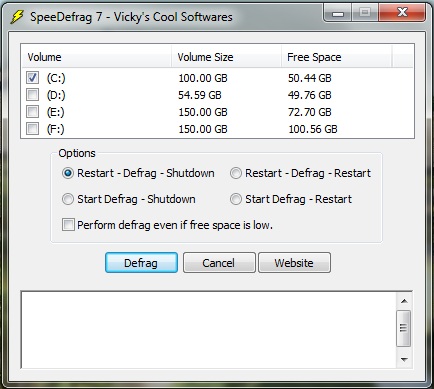
    SpeeDefrag is the exclusive freeware program, which optimizes Windows defrag. It restarts your computer, which refreshes the RAM and loads just the defrag.exe program. This imposes minimum load on the system and therefore defragmentation speed is increased. This small software will also shutdown or restart your computer automatically once defrag is over. It supports scheduling of defrag and now it also performs disk checking before defrag.

    Download

    FileList V2.0


    FileList is a command line utility that produces a list of files of the given path in the CSV format, which can be imported in a spreadsheet or database. The list includes the file name, the size, the path, the file extension, the owner of the file (only Windows NT/2000/XP) as well as the last access and change date and the creation date of the file. Optionally the author of MS Office documents can be displayed.

    Download

    HeavyLoad V2.3


    Heavyload is intended to stress all resources of a PC (the CPU, RAM, hard disk, network, operating system, etc.) in order to test reliability under a heavy load. This is useful for testing important MS Windows file or database servers before using them for production, or just to check if your new PC might get too hot when used intensively. To stress your PC or server, HeavyLoad writes a large test-file to the temp folder, it allocates physical and virtual memory and it draws patterns in its window.

    Download

    NTFSRatio V1.3

    NTFS offers file based compression but the compression rate isn't displayed anywhere. For any folder on an NTFS volume, NTFSRatio shows the size and the compression rate of this folder and also of its subfolders. Compression and decompression can be done inside NTFSRatio with immediate review of the result. Results can be printed or exported. NTFSRatio can be called from the Explorer context menu of any folder.

    Download

    TreeSize Free V2.1

    Every hard disk is too small if you just wait long enough. TreeSize Free tells you where precious space has gone to. TreeSize Free can be started from the context menu of a folder or drive and shows you the size of this folder, including its subfolders. You can expand this folder in Explorer-like style and you will see the size of every subfolder. Scanning is done in a thread, so you can already see results while TreeSize Free is working. The space, which is wasted by the file system, can be displayed and the results can be printed in a report. TreeSize Free is freeware for Windows 9x/2000/XP/Vista.

    Download

    Disc Space Reporter


    Disc Space Reporter is a simple and effective program which gives you a clear insight where you stuffed your hard drives with data you don't even remember anymore.

    Download